Professional Concrete Footing Design Software
Design spread footings faster with WebStructural's powerful foundation designer. ACI 318 compliant. Try it free today.
Start Designing NowWhat is WebStructural Footing Designer?
WebStructural Footing Designer is a professional concrete foundation design tool built specifically for designing spread footings. Whether you're a structural engineer, foundation specialist, or student, our footing designer makes complex foundation calculations simple and accurate.
Built on proven structural analysis methods and fully compliant with ACI 318 design standards, WebStructural provides accurate, code-compliant footing designs you can trust. Design footings supporting columns, pedestals, or base plates - all right in your browser with no installation required.
Why Choose WebStructural Footing Designer?
Instant Results
Real-time design checks as you work. See bearing pressure, shear, and flexure results instantly.
ACI 318 Compliant
Industry-standard concrete design per ACI 318. All checks follow the latest code provisions.
Complete Analysis
Automated one-way shear, two-way shear (punching), flexure, and soil bearing checks.
Cloud-Based
No installation needed. Access your designs anywhere, anytime from any device.
Detailed Reports
Comprehensive calculation reports with all design checks, ratios, and reinforcement details.
Made for Engineers
Built by structural engineers, for structural engineers. Intuitive workflow that matches your process.
Comprehensive Footing Design Capabilities
ACI 318 Design Checks
- Soil bearing pressure verification
- One-way shear (beam shear) checks
- Two-way shear (punching shear) checks
- Flexural capacity and reinforcement
- Development length verification
- Minimum reinforcement requirements
Flexible Geometry Options
- Square or rectangular footings
- Custom footing dimensions
- Adjustable footing thickness
- Column or pedestal support
- Square or rectangular columns
- Base plate dimensions
Material Properties
- Multiple concrete strengths (3000-10000 psi)
- Standard rebar grades (Grade 40, 60, 75)
- Customizable soil bearing pressure
- Concrete cover specifications
- Lightweight concrete support
- Material property validation
Loading Options
- Axial loads (compression/tension)
- Biaxial bending moments
- Multiple load combinations
- Service and factored loads
- Load case organization (D, L, Lr, S, W, E)
- Automatic LRFD load combinations
Reinforcement Design
- Standard rebar sizes (#3 through #11)
- Automatic bar spacing calculations
- Maximum and minimum spacing checks
- Bar count and layout optimization
- Development length verification
- Temperature and shrinkage reinforcement
Design Reports & Visualization
- 3D footing visualization
- Bearing pressure distribution diagrams
- Capacity ratio summaries
- Detailed calculation steps
- Reinforcement layout drawings
- Print-ready documentation
How Footing Designer Works
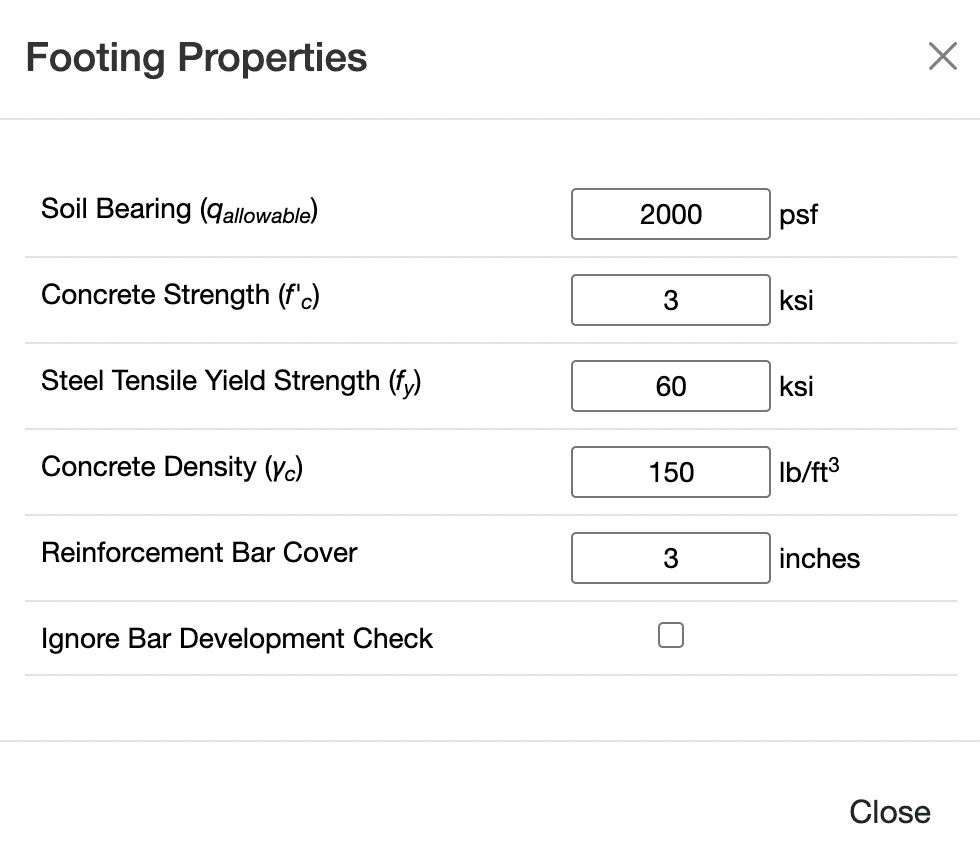
1. Define Soil & Material Properties
Start by entering your allowable soil bearing pressure from the geotechnical report. Then specify concrete strength (f'c) and reinforcing steel grade (fy). These fundamental properties govern your footing design capacity and required reinforcement.
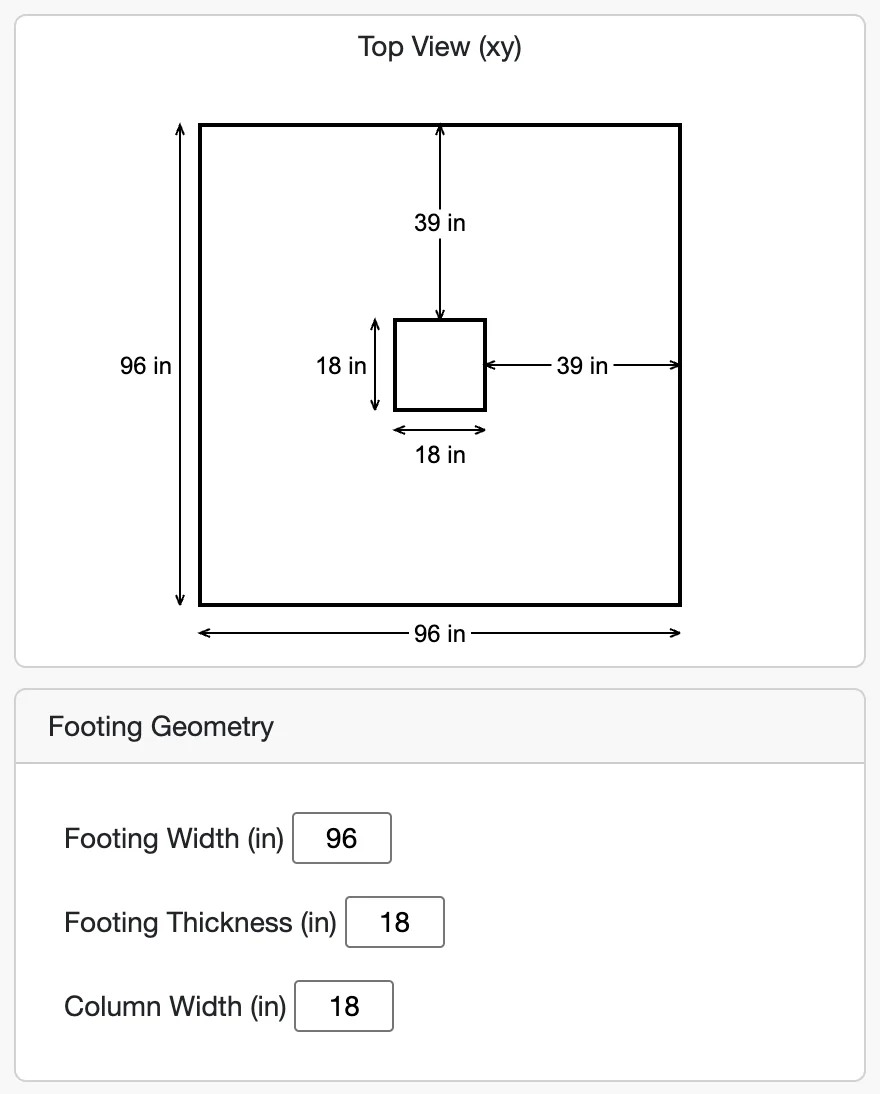
2. Set Footing Geometry
Configure your footing dimensions - length, width, and thickness. Define the column or pedestal geometry that the footing will support. The app provides a 3D visualization so you can verify your geometry is correct before proceeding.
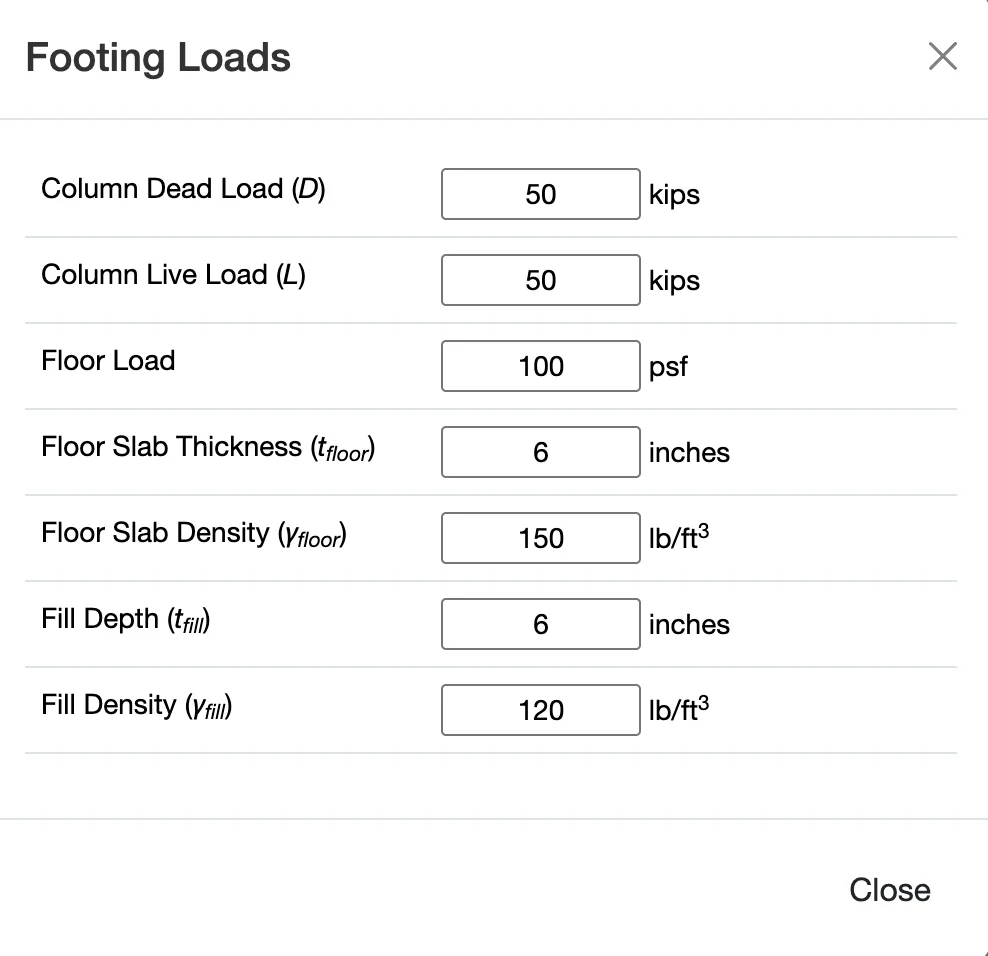
3. Apply Loads
Enter your design loads - axial force and biaxial moments. Organize loads by load case (dead, live, wind, seismic, etc.) and the app automatically applies LRFD load combinations per ACI 318 and ASCE 7 provisions.
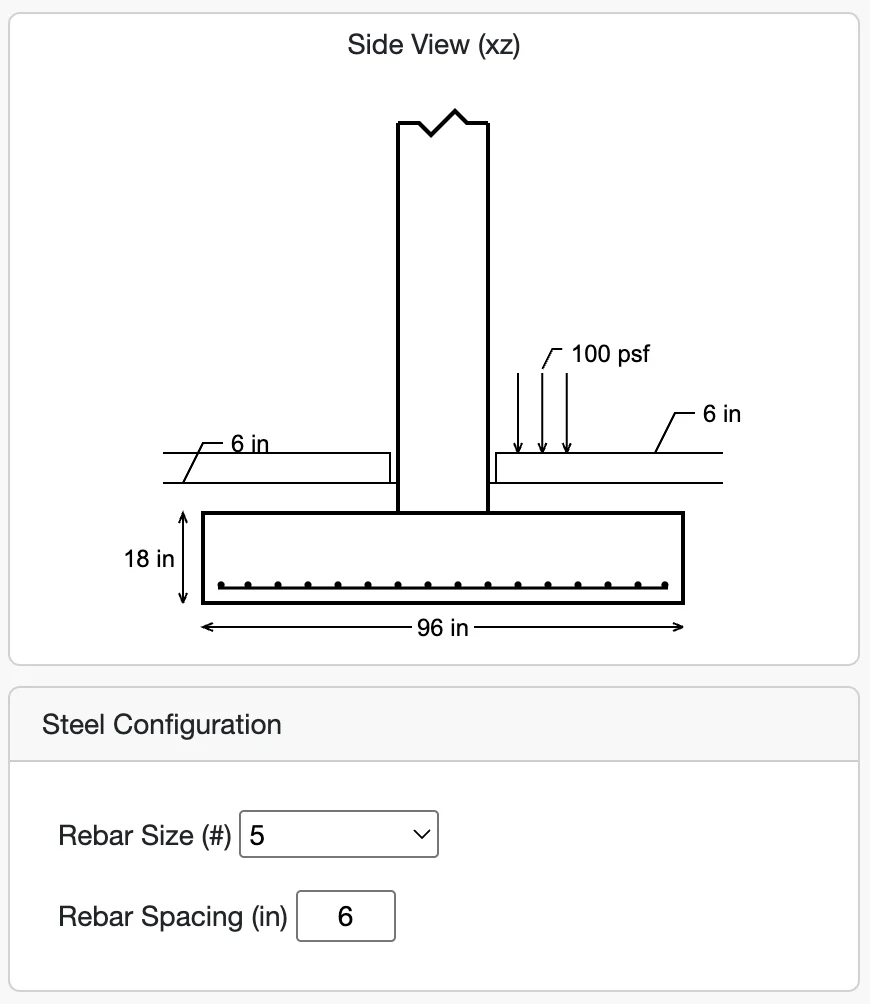
4. Design Reinforcement & Review
Specify your reinforcing bar sizes and spacing. WebStructural instantly performs all design checks - soil bearing, one-way shear, two-way shear, flexure, and development length. See capacity ratios, required bar counts, and detailed calculations in real-time.
Automated Design Checks
Soil Bearing Pressure
Verifies that the maximum soil bearing pressure under all load combinations does not exceed the allowable soil bearing capacity. Calculates bearing pressure distribution including effects of moments (eccentricity).
- Service load combinations
- Eccentric loading analysis
- Uplift checks
- Bearing pressure distribution diagrams
One-Way Shear (Beam Shear)
Checks beam shear capacity at critical sections located at distance 'd' from the face of the column. Ensures the concrete can resist one-way shear forces without requiring shear reinforcement.
- Critical section identification
- Shear strength calculations (φVc)
- Both X and Y directions
- Capacity ratio reporting
Two-Way Shear (Punching Shear)
Evaluates punching shear around the column perimeter at d/2 from the column face. This is often the controlling check for footings. Verifies concrete can resist concentrated loads without shear reinforcement.
- Critical perimeter calculation
- Punching shear strength (φVc)
- Column location factor (βc)
- Moment transfer effects
Flexure & Reinforcement
Calculates required flexural reinforcement based on factored moments at the critical section (face of column). Checks minimum and maximum reinforcement ratios, bar spacing, and development length.
- Required steel area (As,req)
- Minimum reinforcement (ACI 7.6.1)
- Maximum spacing requirements
- Development length verification
Built for Foundation Professionals
Structural Engineers
Save hours on foundation design with instant calculations and ACI 318 compliant results. Perfect for preliminary sizing or detailed design.
- Fast preliminary footing sizing
- Detailed design documentation
- Code-compliant calculations
- Save and manage projects
Students & Educators
Learn concrete design with interactive visual feedback. Understand how soil pressure, geometry, and reinforcement interact.
- Visual learning tools
- Step-by-step calculations
- Comprehensive tutorials
- Free tier available
Contractors & Builders
Quickly verify footing sizes and reinforcement on the job. Simple interface with easy-to-understand results.
- Easy-to-read capacity ratios
- Quick footing checks
- Mobile-friendly design
- No installation needed
Technical Specifications
Design Standards
- Concrete: ACI 318-14 Building Code
- Loads: ASCE 7 load combinations
- Method: LRFD (Load and Resistance Factor Design)
- Reinforcement: ACI 318 detailing requirements
Analysis Features
- Soil bearing pressure analysis
- One-way and two-way shear checks
- Flexural design and reinforcement
- Development length verification
Supported Configurations
- Footing Shapes: Square and rectangular
- Column Shapes: Square, rectangular, circular
- Concrete Strengths: 3000-10000 psi
- Rebar: Grade 40, 60, 75 in sizes #3-#11
Platform
- Web-based (Chrome, Firefox, Safari, Edge)
- No installation required
- Cloud storage for projects
- Responsive design for mobile and tablet
Ready to Design Better Footings?
Join thousands of engineers who trust WebStructural for fast, accurate foundation design. Start your free trial today - no credit card required.